
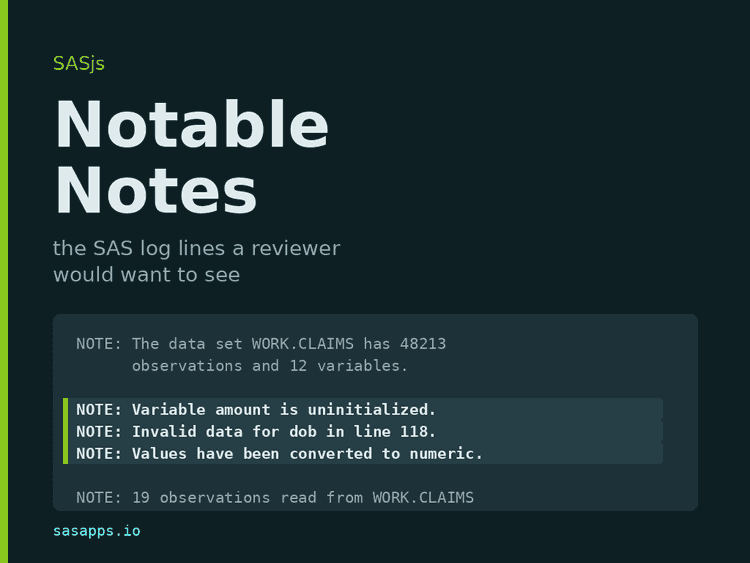
A SAS log is mostly notes. A single evening of PROC steps will print thousands of NOTE: lines, and almost none of them means anything: how many observations were read, how many were written, how long a step took. Then SAS prints, in exactly the same format and the same colour, a note that says a variable was never initialised, or that a date failed to convert. That line is the bug. It sits between two hundred lines that are not.
This post is about a quality-of-life improvement we have just added to the SASjs tooling: sort the notes into two piles, print one pile, and throw the other away. Neither the problem nor the answer is new - SAS programmers have been narrowing a log down to its interesting lines for as long as there have been logs, and the tools that do it are listed below. What is new is that the same list now runs inside our editor, our Studio, our CLI and our CI, from one implementation. This post covers where the list of “notes worth reading” came from, the other people who have solved this problem, and how the same list is applied in @sasjs/utils, sasjs logcheck, SASjs Server and the SASjs VS Code extension.
The idea - a closed list
Every log-checking tool arrives at the same compromise:
- report every
ERRORand everyWARNING, because those are unambiguous, and - report a
NOTEonly when its text matches one of a small, fixed set of phrases that mean something went quietly wrong.
That fixed set is what Yutaka Morioka calls the notable notes. It is deliberately short, deliberately closed, and it is the whole of the idea. The notes that make it are not failures: SAS completed the step, allocated the data set, and returned. The step simply did something the programmer did not ask for, and SAS mentioned it in passing:
NOTE: Variable amount is uninitialized.
NOTE: Invalid data for dob in line 118 3-9.
NOTE: Character values have been converted to numeric values.
NOTE: The meaning of an identifier changed at line 4021.
NOTE: A CASE expression has no ELSE clause.
NOTE: MERGE statement has more than one data set with repeats of BY values.
NOTE: At least one W.D format was too small for the number to be printed.
and, in the statistical procedures, a group of notes that would otherwise be lost entirely:
NOTE: Some tick values have been thinned.
NOTE: An infinite likelihood is assumed in iteration 5.
NOTE: Estimated G matrix is not positive definite.
NOTE: Processing on disk occurred during summarization.
None of those stops a batch job. All of them change a result. A reviewer wants to see every one, and wants to see nothing else.
Where the list came from
We did not invent the phrases, and we did not want to. Writing a keyword list by hand from memory produces a list of messages the author happened to hit last month.
SASLogChecker
Most of the list we ship comes from SASLogChecker, by Yutaka Morioka, released under the MIT licence. It is a set of SAS macros that scan a log window or a directory of logs and summarise the ERROR, WARNING and notable NOTE messages they find.
Three things made it the source rather than merely a reference:
- It has a specification.
Note_spec_1.0.xlsxin the repository lists every target message with a minimal reproducing program, the message as SAS prints it in Japanese, the same message in English, the keyword to match, and the keyword’s hexadecimal form. That is a test matrix, not an anecdote. - It is old enough to be upstream. Its first commit (July 2025) already carried the list, so the direction of travel is settled - we took from it.
- It carries the statistical notes. The user-group papers (below) catalogue data-step problems and stop short of
PROC MIXED.
One detail from reading it is worth recording, because it explains the shape of our list. The macro matcher greps hex-encoded Japanese text, because it reads logs from a Japanese Windows SAS session - a term in the macro looks like this:
term="8C8791B9926C82F08ADC82F182BE8C768E5A"xSo the English wording in our list comes from the specification spreadsheet’s “Message (English)” column, not from the matcher. The consequence for us is a known limitation: our parser matches English text only, so a Japanese-language SAS log yields no notable notes from it.
Two of the thirty-two entries are not from SASLogChecker. They come from Phil Mason’s Log Viewer - Log Analysis/rules.json in his Wood Street Consultants repository, February 2023 - which applies a JSON rule set to a log line by line and marks each rule interesting or not, so a reviewer can read a short view. Two of its rules caught notes we were missing: a NOTE: ERROR DETECTED IN ANNOTATE= DATASET where SAS/GRAPH failed and the step still returned, and the outside of the axis range wording, which our single string outside the axis range did not match.
The conference papers
The SAS user-group literature has solved this problem several times over. All of these were read in full, not skimmed from a search result:
- SUGI 31, paper 128-31 (2006) - “You’ve Got E-Mail: Automatic Log Checking via E-Mail Notification”, Aaron Augustine and Prasenjit Dutta (PDF). The oldest. Greps six strings and sets a macro variable when one is found.
- SAS Global Forum 2012, paper 042-2012 - “Log Checks Made Easy”, Yogesh Pande (PDF). A
%log_checkmacro over a folder of.logfiles, tabulated withPROC REPORT. Its list is ten categories rather than ten strings: errors, warnings, uninitialised variables, format not found, repeatedBYvalues in a merge,DROP/KEEP/RENAMElists never referenced, decimal shift, unresolved symbolic reference, overwritten variables, andLENGTHnot first. - SAS Global Forum 2017, paper 1173-2017 and MWSUG 2017, paper TT02 - “Check Please: An Automated Approach to Log Checking”, Richann Watson (PDF, PDF). The same paper delivered twice. Lists eight common messages - the recurring core of the vocabulary.
- PharmaSUG 2008, paper CC02 - “%LOGCHECK: a Convenient Tool for Checking Multiple Log Files”, Suzanne M. Humphreys (PharmaSUG 2008 index).
FILENAME PIPEover a directory of logs, SAS 9.1.3, Windows, interactive. No additional vocabulary, but the report layout everyone copies.
These are background, not the source: their lists are shorter, worded differently, and none contains the statistical notes. Where we agree with them is on the shape of the answer - every one of them decided that a NOTE is worth reporting only when it matches a known phrase.
Three implementations worth reading for other reasons
- vdebbeti/SAS-Log-checker-CLI is 89 lines of Python with one regex anchored to the message prefixes, so a
NOTE:inside a quoted string or a printed data set does not match. It reports every note and has no keyword list at all - but its command line (--fail-on error|warning|note|none, JSON output) is a good shape, and we borrowed it forsasjs logcheck. - SAS Institute’s own VS Code extension parses
ERRORandWARNINGonly, and no notes at all - the opposite decision. Its value is elsewhere:logParser.tsmaps a message back to the source line using the pointer lines SAS prints (a run of dashes, then the column numbers under the token). Two rules we took from it: a pointer line must not be absorbed into the message above it, and a log viewer that is not attached to an editor should still report positions in the log text. - philipmason/Wood-Street-Consultants is the Log Viewer:
Log Analysis/rules.jsonplus%filecheckwithrules, a JSON rule set, a SAS macro that applies it and a browser viewer that colours the matches. Each rule carries atype, aninterestingflag and the HTML to wrap a match in, so one file drives the report in SAS and the colouring in the browser - theinterestingflag is our notable notes by another name, and it is where two of our keywords came from. Its engine is the reason to keep ours:prxmatchruns per physical line and unanchored, so a message SAS wraps is missed and a rule can fire inside a printed data set, and the colouring markup lives in the rule data rather than in the host. ItsWARNINGrule is also more suppressive than ours - a negative lookahead drops product-expiry warnings and any warning line mentioningMPRINT,MLOGICorSYMBOLGEN. That is a policy choice rather than an oversight, and the opposite of ours: we report every warning.
Where to find the papers - saslexicon.org
The papers above were mostly found at SAS LEX.ICON, the community archive Lex Jansen built and which is now maintained in his memory. It indexes the proceedings of sixteen SAS user-group conferences - SUGI/SGF, MWSUG, PharmaSUG, PHUSE, WUSS, SESUG, NESUG and the rest - with 37,396 papers and presentations, each searchable by title, author, abstract and keyword, going back to 1976.
Two reasons to use it rather than a search engine. First, the papers are not always still at the URL a citation gives: the PharmaSUG 2008 index is where that paper can currently be found. Second, the archive carries the abstract for every entry, which is what lets you tell in ten seconds whether a log-checking paper has a vocabulary in it or only a report layout. It is a hosting location, not a publisher - all copyrights stay with their owners.
The list, as SAS Packages
SASLogChecker is distributed as a SAS package, so if you want to run the original rather than read it, you install it with the SAS Packages Framework by Bartosz Jablonski:
filename packages "/path/to/your/packages";
%include packages(SPFinit.sas);

%installPackage(SASLogChecker,
  sourcePath=https://github.com/Morioka-Yutaka/SASLogChecker/raw/main/)
%loadPackage(SASLogChecker)
%interact_logchk checks the current log window; %logchk2directory(folder=..., out_folder=...) walks a directory and writes summary reports. The framework’s own archive, SASPAC, is where to look for others - it carries sasjscore alongside SASLogChecker.
How it is implemented in SASjs
The list is one thing; the parser is another. We put the parser in one place, because the alternative - an editor plugin, a browser pane and a CI gate each with their own regex - is how a log starts reading differently depending on where you open it.
The examples in each section use the same three log files - written for this post in the shape of a real overnight batch, then run through the actual tools: a clean-looking run whose only findings are seven notable notes, one legacy job that fails on an unresolved libref and two coded syntax errors, and a Python build log that the tools must leave alone.
1. @sasjs/utils/logs
The library publishes a logs subpath with two pure functions and no imports at all, which is what lets the same code run in Node, in a browser bundle and inside an editor extension:
import { parseLog } from '@sasjs/utils/logs'

const issues = parseLog(logText)
for (const issue of issues) {
  // issue.line, issue.column, issue.endLine, issue.endColumn
  // issue.severity: 'error' | 'warning' | 'note'
  // issue.code?: '22-322'   issue.message: the folded text
}
parseLog returns every ERROR and WARNING, and a NOTE only when its message matches NOTE_KEYWORDS - thirty-two patterns, matched case-insensitively against the folded message:
const NOTE_KEYWORDS = [
  'is uninitialized',
  'Missing values were generated',
  'Invalid data',
  'have been converted to',
  'too small for',
  'repeats of BY values',
  'LOST CARD',
  'NOEXEC',
  'have been thinned',
  'infinite likelihood',
  'not positive definite'
  // ...and twenty-one more
]

export const isNotableNote = (message: string): boolean =>
  NOTABLE_NOTE.test(message)
The details that matter, and why:
- The match runs on the folded message. SAS wraps a long note over several physical lines, so a keyword can land on the second line. Wrapped lines are folded into one issue first (up to a limit, so a malformed log cannot run away), and one problem is reported as one issue rather than one per line.
- Only the colon form counts for notes.
NOTE:is a message; any line beginningNOTEis not, and matching the latter would readmit the whole notes stream. A coded note (NOTE 49-169:) is a note and keeps its code, because the code is what--ignore-codekeys on. ERRORandWARNINGalso match without the colon, in the form SAS writes when it continues a message:ERROR Libref X is not assigned.- Thirty-two keywords are one regex. Testing thirty-two
includescalls per note, over a log holding thousands of notes, was measurably slower than one alternation; the module’s other hot path is a fast return fromclean()when a line carries no markup and no double space. - Nothing is split into lines. A 16 MB log becomes millions of strings if you build an array of lines. One global regex pass over the text, with line numbers counted forward from the previous match, costs a fraction of that.
- ODS HTML logs parse too. A tag sequence before the marker is skipped and markup is stripped from the reported message, so the same parse serves a plain log and an HTML one.
isSasLogis the guard. A Python log writesERROR:root:boomand a shell build log writesERROR: Command failed with exit code 1. The marker alone proves nothing, so the test looks for what only SAS prints about itself: the banner, a coded marker, or padded step numbers. A host that publishes diagnostics treats a false answer as “not obviously SAS” rather than “not SAS” - a trimmed excerpt carries none of the three.nextIssue(issues, line, direction)walks the list with wrap-around, which is the behaviour both a “next problem” and a “previous problem” button need.
@sasjs/sas-language re-exports the same functions as @sasjs/sas-language/logs, for hosts that load that package and nothing else. There is one implementation behind both entry points.
2. sasjs logcheck - the CLI
sasjs logcheck needs no target, no login and no project: a log from Enterprise Guide or from a server somewhere else checks the same way.
sasjs logcheck                       # every log in sasjsresults, fail on any ERROR
sasjs logcheck ./logs                # every file under ./logs, skipping non-SAS logs
sasjs logcheck run.log --fail-on warning
sasjs logcheck --max-warnings 10
sasjs logcheck --ignore-code 49-169  # repeatable: a code you have decided to live with
sasjs logcheck --format annotations  # GitHub Actions annotations
--format json is there for a pipeline that wants to read the result rather than print it, and --format annotations underlines each issue in the workflow log. The policy lives in sasjsconfig.json so it can be reviewed like any other project setting, and the command-line flags override it:
{
  "logCheck": {
    "failOn": "error",
    "maxWarnings": 10,
    "ignoreCodes": ["49-169"],
    "ignorePaths": ["sasjsresults/legacy"],
    "folder": "sasjsresults",
    "autoCheck": false
  }
}
The design decision worth stating plainly is the default: failOn is error, not note. A notable note is what legacy code produces in bulk, and a gate that goes red on day one gets switched off on day two. The notes are reported - the run does not fail on them unless you ask.
The same check rides along with the commands that already receive a log - run, request, job execute, flow execute and fs deploy/fs sync. It prints the issues it finds, and fails the command only when --logcheck was passed or logCheck.autoCheck is on, because the exit code of a deploy is load-bearing in a pipeline and is not something to change behind a project’s back.
Point it at the clean-log run and this is what comes back - the FILE table is the summary a pipeline wants, and the LINE:COL list under it is what a human wants when the table says FAIL:
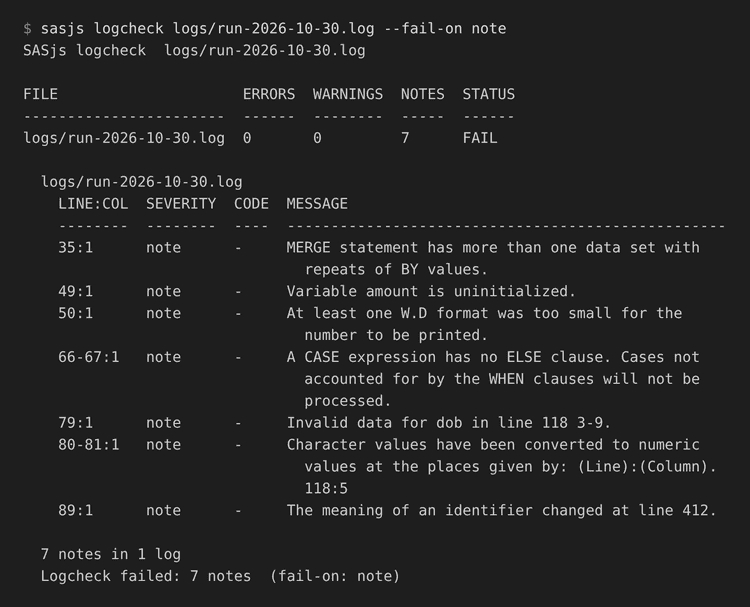
FILE                     ERRORS  WARNINGS  NOTES  STATUS
-----------------------  ------  --------  -----  ------
logs/run-2026-10-30.log  0       0         7      FAIL

  7 notes in 1 log
  Logcheck failed: 7 notes  (fail-on: note)
That run was asked to fail on a note. Leave the policy at its default and the same log passes with the same seven rows printed, which is the behaviour most projects want while they clear the backlog:
sasjs logcheck sasjsresults              # report everything, fail on ERROR only
sasjs logcheck sasjsresults --fail-on warning
sasjs logcheck sasjsresults --fail-on note --max-warnings 10
Raising the bar is a one-line change in sasjsconfig.json and it can be done in stages: fix the errors, move failOn to warning, fix those, move it to note, then add maxWarnings as a ratchet so the count can fall but not rise. Two more knobs keep the gate honest while it is being introduced - ignoreCodes for a message the team has formally accepted (keyed on SAS’s own message code, e.g. 49-169, not on wording), and ignorePaths for a legacy folder.
For a CI job, --format annotations turns each finding into a workflow command, so the issue appears on the pull request and in the run summary:
::error file=logs/legacy-2026-10-29.log,line=21,col=1,endLine=21,endColumn=73,title=SAS ERROR 22-322::Syntax error, expecting one of the following: a name, *, ;
::notice file=logs/run-2026-10-30.log,line=49,col=1,endLine=49,endColumn=40,title=SAS NOTE::Variable amount is uninitialized.
GitHub Actions renders those as annotations on the diff; Gitea Actions accepts the same workflow commands. The positions come from the parser, so the annotation underlines the line in the log rather than in the source.
One more thing a pipeline gets for free: pointing the command at a folder of mixed artefacts is safe, because a file that is not obviously a SAS log is skipped rather than parsed:
1 file skipped (not a SAS log, or excluded) - rerun with --verbose to list them.3. SASjs Server - the Studio log pane
The Studio log pane parses with the same parseLog. The log is still handed to the viewer exactly as SAS wrote it - nothing is rewritten and nothing is highlighted by injecting markup, so a doxygen header’s <h4> SAS Macros </h4> stays text.
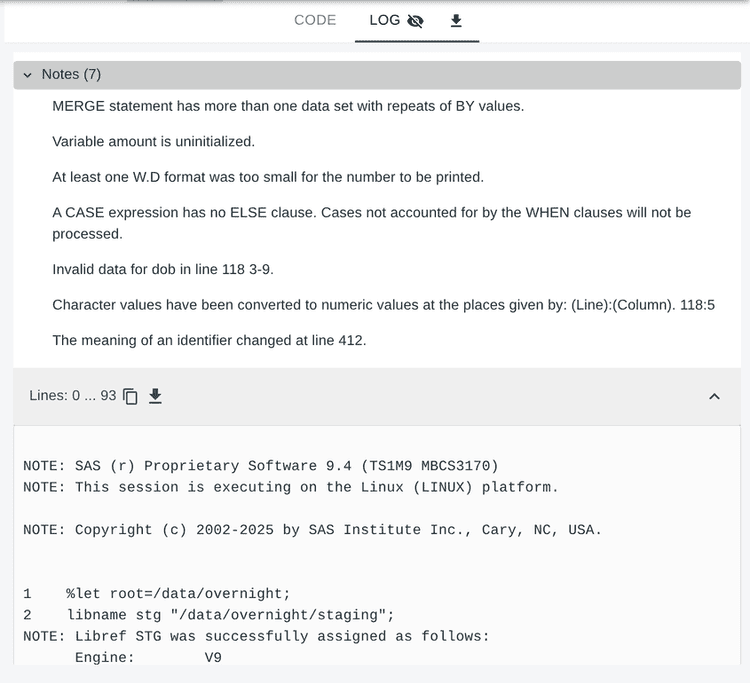
The Studio flow is the same list at the moment you need it. Run a job, open the log tab in the results pane, and the tab itself tells you what is in there: an error icon if there is an error, a warning icon if there is a warning. Open it and the pane lists the issues for the chunk on screen; clicking one jumps to its line, so a 50 MB log is navigable by its findings instead of by scrolling.
The eye button on the tab hides the notable notes for that view, and the same switch is on the Studio settings page as log.notableNotes, so the preference follows the user rather than the run. It defaults to on; with it off, the pane carries errors and warnings only.
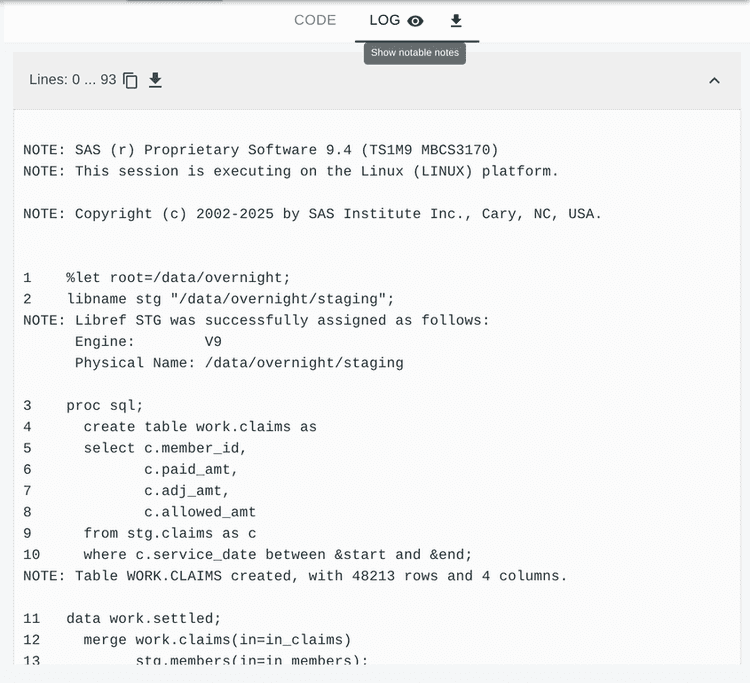
The download button still hands over the log exactly as SAS wrote it, byte for byte - the parsing is a view over the log, never a rewrite of it.
Large logs are rendered in chunks of 20,000 lines by default, each chunk a substring of the log rather than an array of lines, so the text is held once however long it is. The issue list is then the fast way to find the interesting line rather than a scroll through the whole log.
4. The SASjs VS Code extension
Open a .log file and the extension gives you the same findings in the editor:
- the error and warning lines are coloured in the log, and the arrows in the editor title bar step between them from the cursor, wrapping at the end;
- every issue is published to VIEW -> PROBLEMS, next to the lint issues, so F8 and Shift+F8 walk them and a click jumps to the line;
- notable notes are published as Information rather than as problems, so errors stay at the top of the list;
- the eye button in the title bar toggles them, and writes
sasjs-for-vscode.logNotableNotesinto the project’s.vscode/settings.json- the setting and the button are the same switch, so a team can commit the choice; - a
.logwritten by something else is left alone, via the sameisSasLogtest, and a log over 32 MB is not parsed at all. Edits are debounced, so typing in a log does not re-parse on every keystroke.
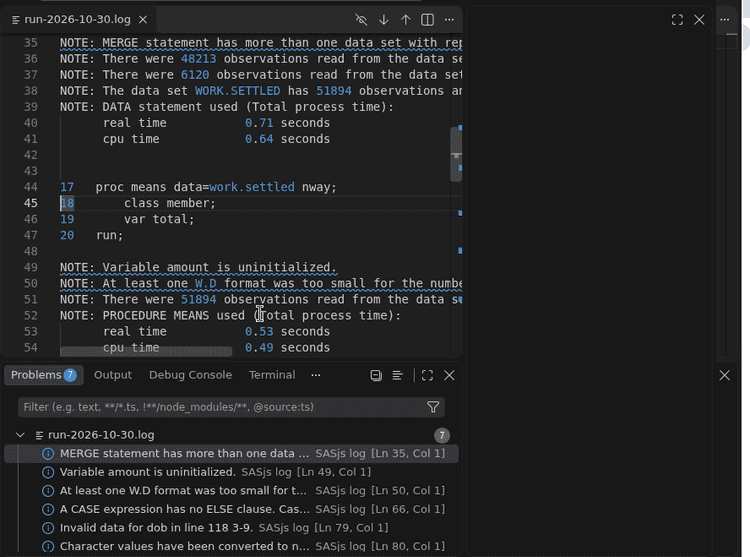
The log in that screenshot has no ERROR and no WARNING, which reads as a green run everywhere else - and that is the point of the exercise: the badge on the Problems panel says seven, because seven notes said something a reviewer cares about. Each is published as Information, with the source SASjs log, so they sort below any real problem in the same file and F8 still walks them.
Two details in that screenshot come straight out of the parser:
- The conversion note is reported at 80-81, because SAS wrapped it over two lines - one problem, not two.
- The note about the
W.Dformat is truncated with an ellipsis in the list because the message is long, and the full text is still there on hover and in the diagnostic.
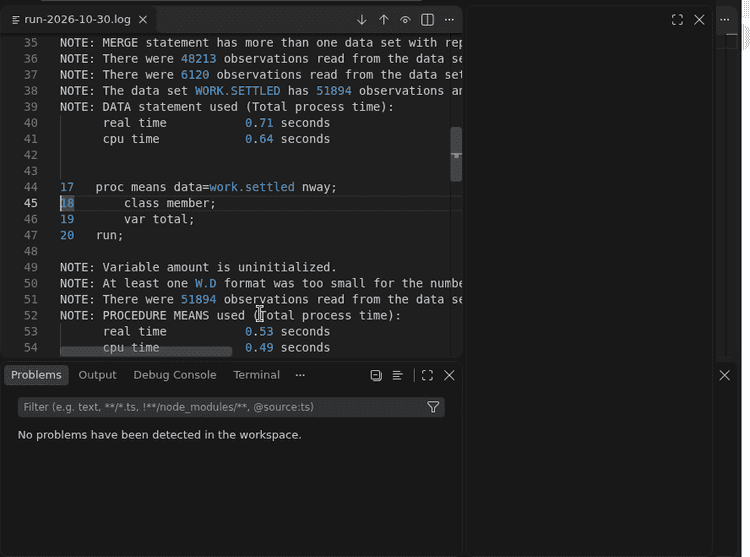
The log text is unchanged in both cases, and untouched in every host: nothing was annotated in the file and nothing was filtered out of it - the switch only decides what the panel lists, which is what lets one team member work with the notes listed and another work with them hidden. The parse produces positions; the host draws.
5. Anywhere else, with the parser in hand
Because parseLog is a pair of pure functions, a team can put the same findings into whatever holds their build output - a release script, a dashboard, a Slack alert:
import { parseLog } from '@sasjs/utils/logs'
import { readFileSync } from 'fs'

const issues = parseLog(readFileSync('overnight.log', 'utf8'))
const notes = issues.filter((issue) => issue.severity === 'note')

console.log(`${notes.length} notable notes, ${issues.length} issues in total`)
for (const note of notes) console.log(`${note.line + 1}: ${note.message}`)
That is the same twenty lines the editor, the Studio pane and sasjs logcheck are built on, which is the reason a keyword added in one place shows up everywhere.
Keeping the list
Two rules, and they are the reason the list can be maintained at all.
Credit travels with the data. Provenance sits in the module’s docstring, and inline next to any keyword that comes from somewhere new, with the message it catches. If you add one, say where you got it, at the point of the addition. A list of phrases with no provenance cannot be reviewed, because the next person cannot tell a deliberate choice from a typo.
Keep it short and closed. Adding a keyword widens what every host reports - the editor, the Studio pane and every pipeline that runs sasjs logcheck. A message belongs on the list when a reviewer would want to see it even though SAS called it a note. That test rejects most candidates, which is the point.
Known limitations, stated rather than hidden: the matcher is English-only, so a Japanese-language log reports no notable notes; and the list is a fixed set of phrases, so a message SAS rewords in a future release drops off silently until someone adds the new wording.
Links
- SASLogChecker - Yutaka Morioka, MIT. The source of the list.
- SAS Packages Framework and the SASPAC archive - how SASLogChecker is distributed.
- Wood Street Consultants Log Viewer - Phil Mason’s
rules.jsonand%filecheckwithrules. Two of the keywords came from here. - SAS LEX.ICON - the user-group proceedings archive, 37,396 papers.
- sasjs/utils -
src/logs/sasLog.ts, the parser and the list. - sasjs/cli -
src/commands/logcheck, thelogcheckcommand and the automatic check. - sasjs/server - the Studio log pane.
- sasjs/vscode-extension -
src/logs/logDiagnostics.ts, decorations and Problems. - sassoftware/vscode-sas-extension - the SAS Institute parser, for pointer-line handling.
- vdebbeti/SAS-Log-checker-CLI - the command-line shape we borrowed.
sasjs logcheck --format annotations is the quickest way to try the idea: point it at a folder of last month’s logs and see what has been printing a note you never read.